/ Case study
N. 01
The operating system for a German water-damage and restoration company. One web app where the office runs every job through six phases, and field technicians see only their own visits, machines and hours.
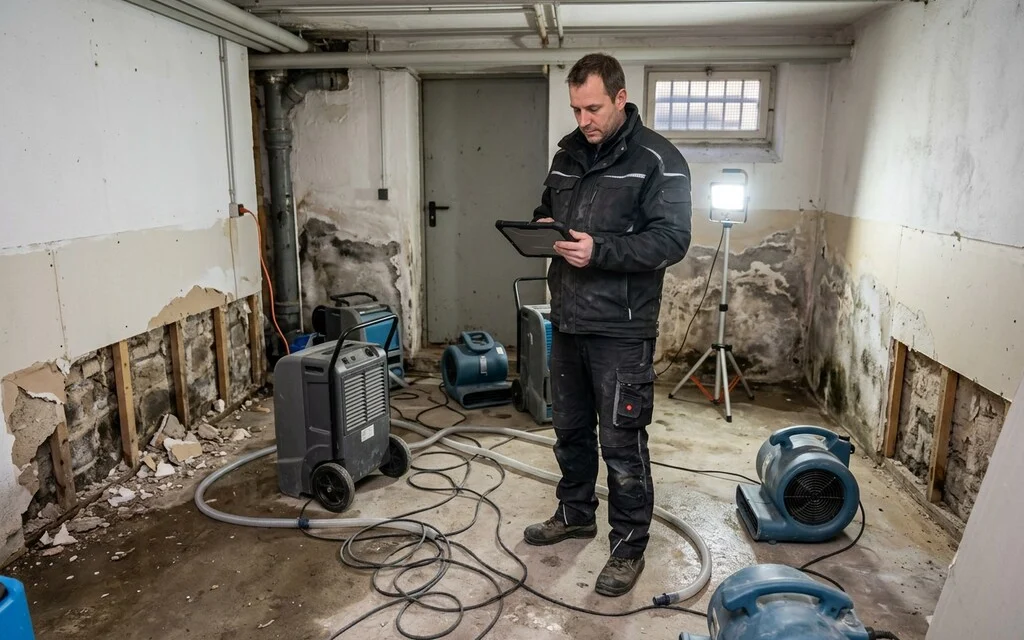
A water-damage job moves through site inspection, a proposal, weeks of technical drying, insurer approval, restoration and finally an invoice. Every step involves different people: the tenant, the property manager, the insurer, the office and the technicians on site.
Along the way the company has to know which dehumidifier stands in which basement, prove with signed measurements that a wall is dry, confirm that every contact has approved a visit before a technician drives out, and keep an audit trail that holds up when the insurer asks questions months later. Maxsan Tracking was built to hold all of that in one place.
Clients, jobs, visits, machines, mail and files in one record instead of scattered tools.
No technician drives out until the people who control access have confirmed.
Measurements, signatures and every change captured in a way an insurer accepts.
Technicians see only their visits, machines and hours, on a phone.
Every project is a job tied to an address, contacts, a project manager and a set of phases. Each phase can be activated, given a progress percentage, completed or reopened, and scheduling its first visit activates it automatically. Select a phase to see what happens inside it.
The first visit after a leak is reported. The office books a technician, collects the leak report and documents the damage on site.
Who Office books the visit, a project manager owns the job, a technician attends.
Project folder Mail request · Leak report and LO invoice
Leaves the phase with A documented damage assessment and the LO invoice.
The company prepares an offer and a sanitation concept and waits for the insurer or property manager to accept it.
Who Project manager and office, with the insurer and property manager as approving contacts.
Project folder Offer / sanitation / TR · Order confirmation
Leaves the phase with A confirmed order, so drying can start.
Dryers and dehumidifiers are deployed by QR scan and run for days or weeks while technicians record measurement protocols until the structure is dry.
Who Technicians booked on TR visits, even if they are not assigned to the whole project.
Project folder Drying reports, timesheets and images · Offer / sanitation / TR
Leaves the phase with A signed measurement protocol proving the structure is dry, and machines returned.
The insurer or client approves the completed drying and the restoration scope. Billing data is captured on the project.
Who Office and project manager.
Project folder Order confirmation
Leaves the phase with Approved scope and billing data, ready for restoration.
The damaged areas are rebuilt: plaster, flooring, paint. Visits are scheduled and approved like every other phase.
Who Restoration crew and project manager.
Project folder Drying reports, timesheets and images
Leaves the phase with A finished property and a completed phase.
The final invoice is filed on the project and the job leaves the open-projects board.
Who Office and admin.
Project folder Invoice
Leaves the phase with A closed job with a complete, auditable history.
WH and RB can also run as one combined phase, WH/RB, when approval and restoration happen together.
A visit is the unit of work in the field. New phase appointments start as pending approval and only reach a technician’s dashboard once someone with approval rights accepts them. Firms and persons linked to the visit carry their own approval status, so the office can see exactly who has confirmed access to the property. A dispatch override exists for emergencies that cannot wait.
Admins see everything. Project managers get a subset chosen permission by permission. Technicians get a separate, focused menu built for a phone in a wet basement.
Sees and changes everything, approves visits, manages users and settings, and can force a logout.
Gets a subset of admin powers, granted one permission at a time, and a narrower home dashboard.
A separate menu with only their own work, built for a phone on site.
Edge case A technician who is only booked onto one drying visit, not assigned to the whole project, can still open that project in a limited way: the drying phase and the offer and sanitation files. They can record measurements without seeing invoices, contacts or the rest of the job.
Each module below answers one operational question the office asks every day.
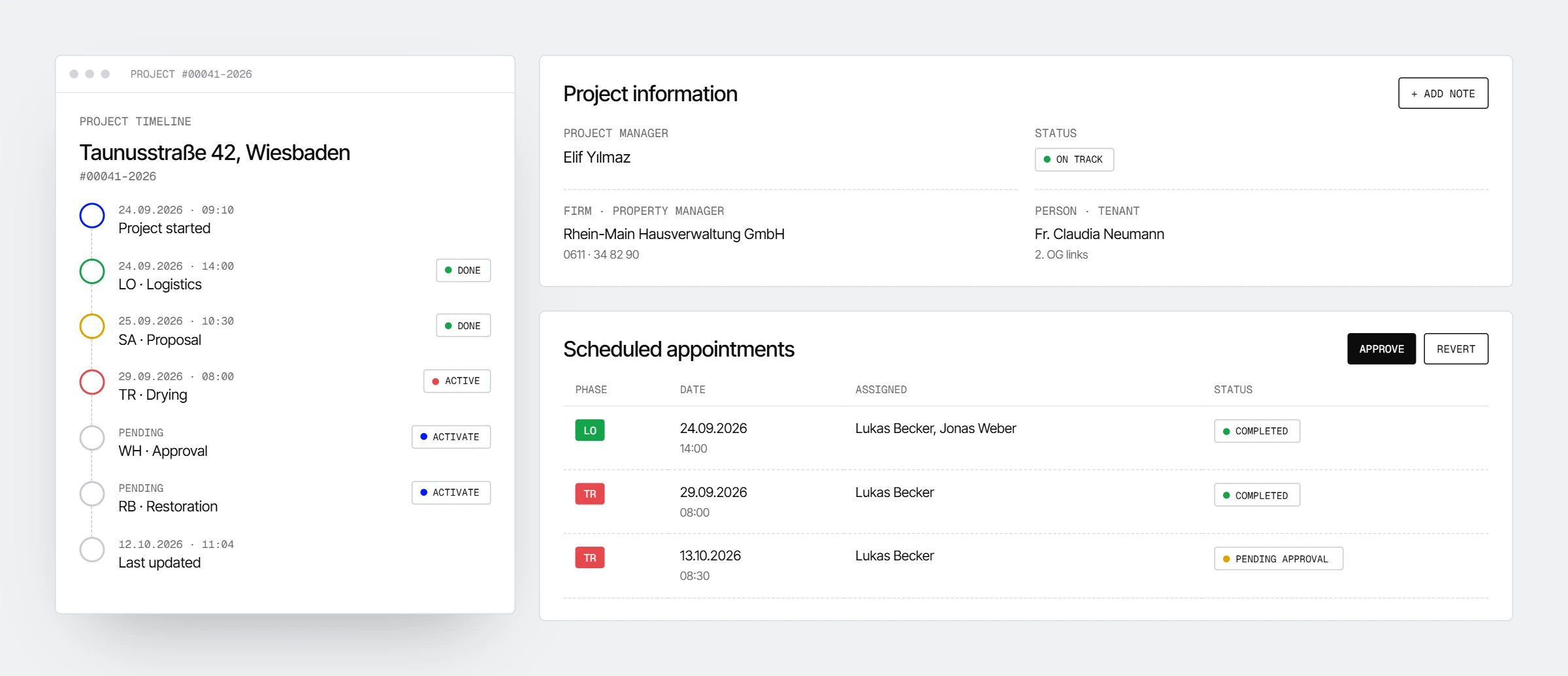
The project page puts a phase timeline beside everything the job is tied to: the manager, firms and persons with their contact roles, every scheduled visit and its approval state. Approve sends a visit to the technician’s dashboard; Revert pulls it back if plans change.
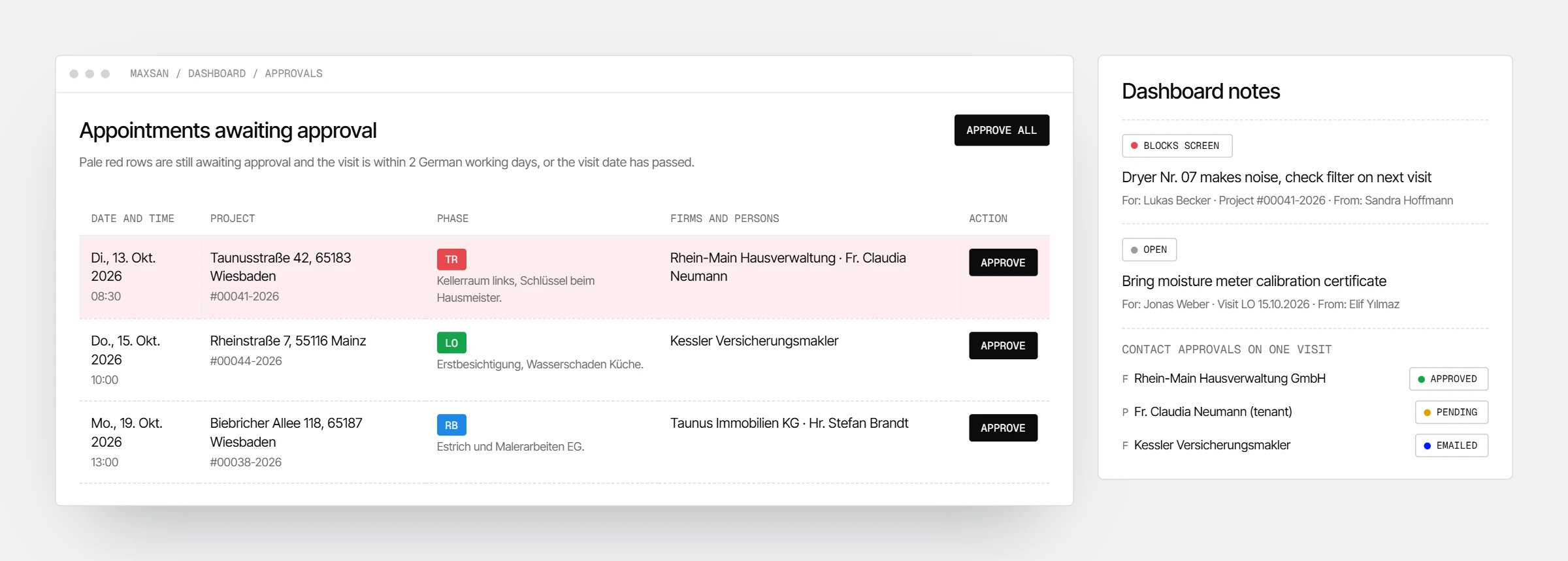
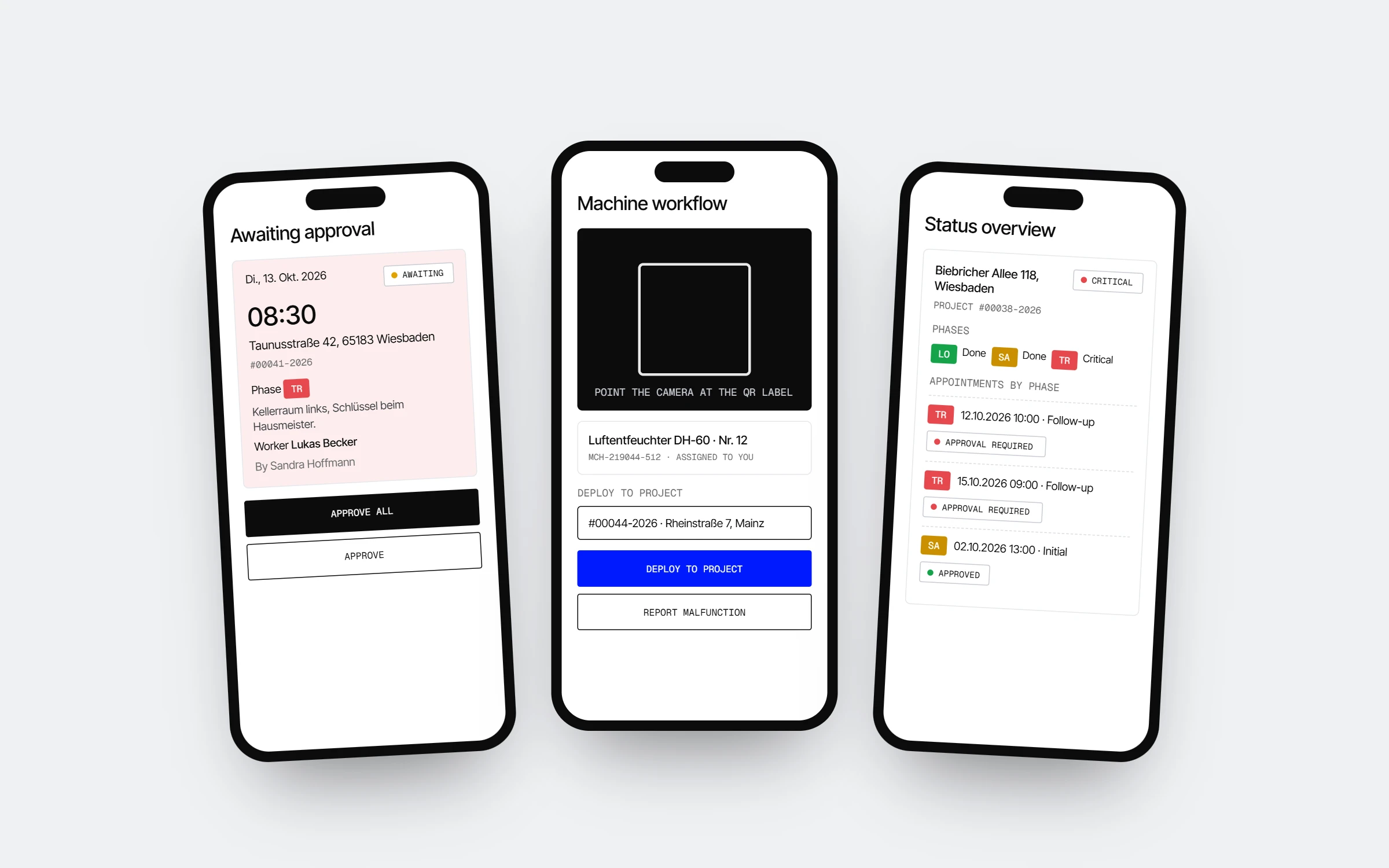
The admin dashboard opens on what needs a decision. A visit is approved firm by firm and person by person, or all at once. If the visit is close and someone still has not confirmed, the row turns pale red, counting only German working days, so weekends and public holidays never trigger false alarms.
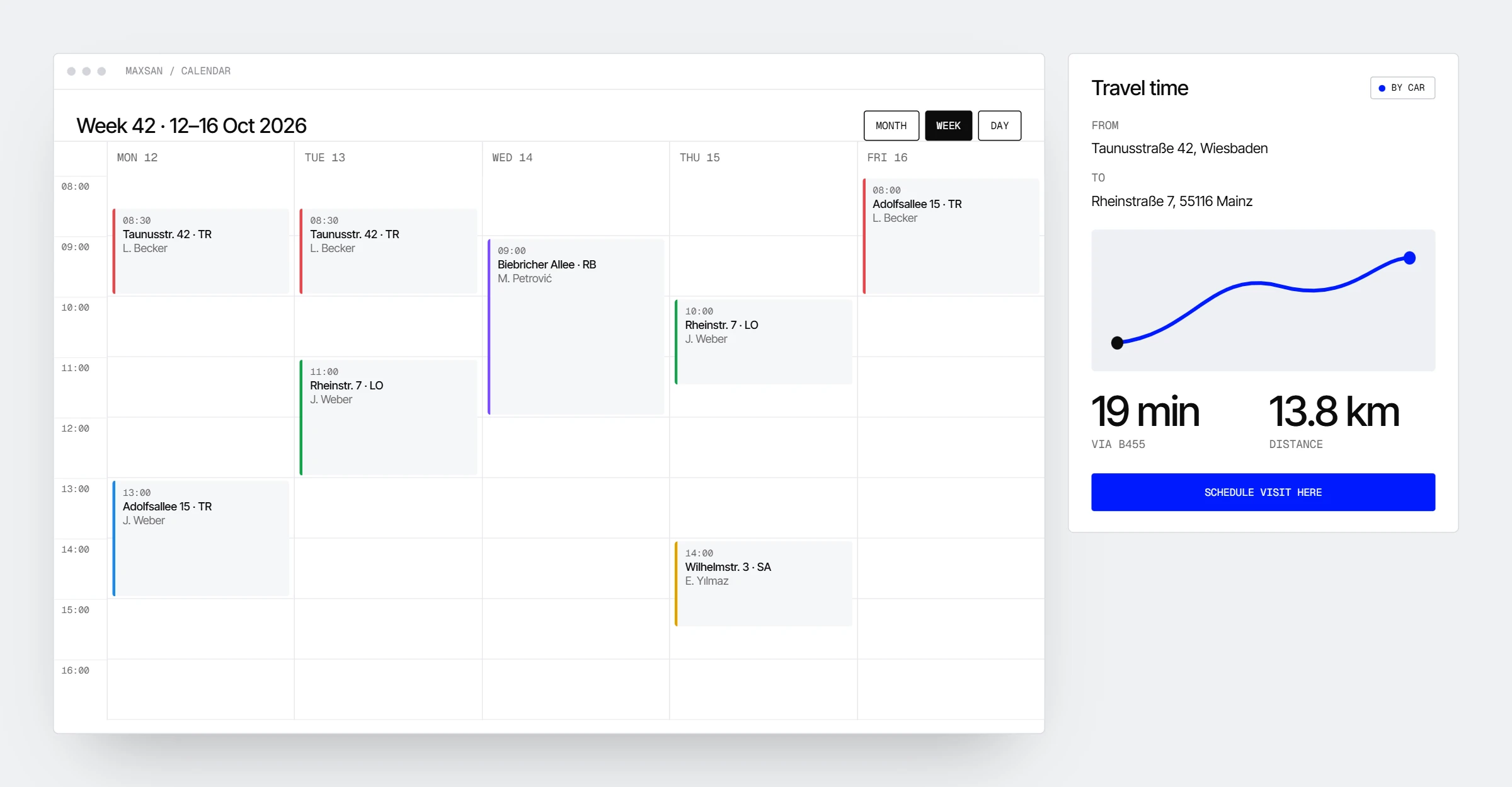
The calendar is company-wide and per project, with month, week and day views and one color per worker. From any visit the planner can calculate travel time to the next site or back to the warehouse by car, on foot, by bike or by public transport, then schedule a visit at the destination in one click.
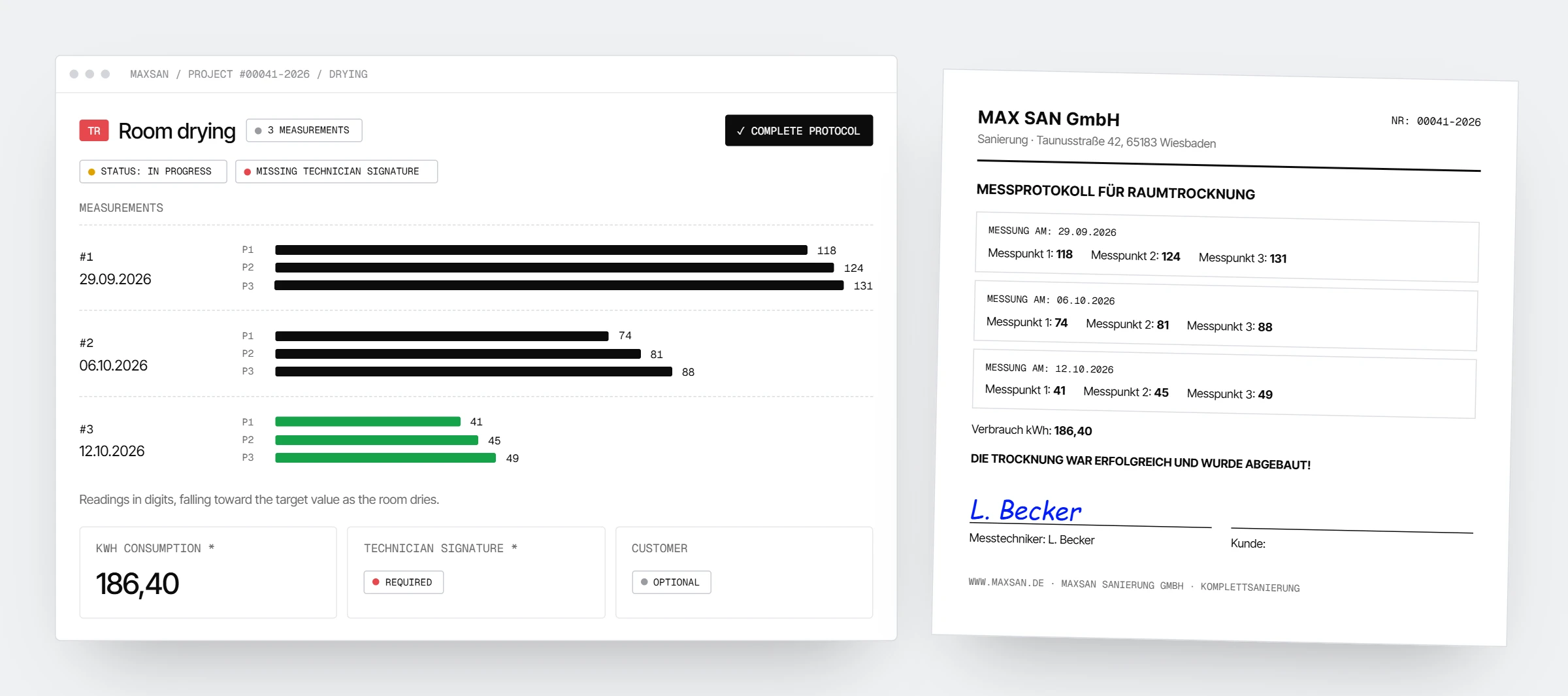
During the TR phase technicians record measurement protocols for room drying or insulation layers. A protocol collects dated readings at three measuring points, then the energy used by the machines and a technician signature, and turns into a branded PDF that lands in the project’s files. The app warns if a completed protocol is missing its PDF.
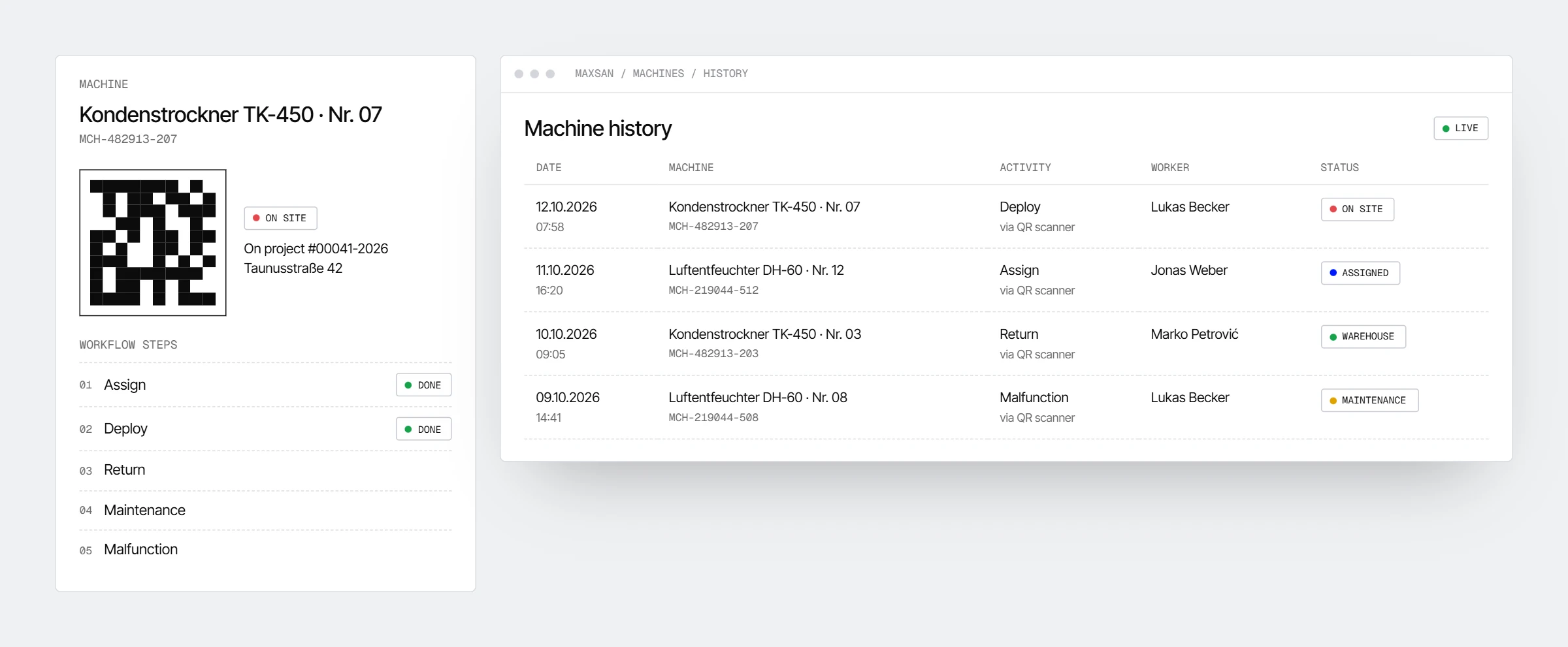
Dehumidifiers and dryers are the company’s most valuable assets, and they spend weeks on site. Every machine gets a printed QR label. A technician scans it in the browser, with no app to install, and assigns it, deploys it to a project, returns it to the warehouse, sends it to maintenance or reports a malfunction.
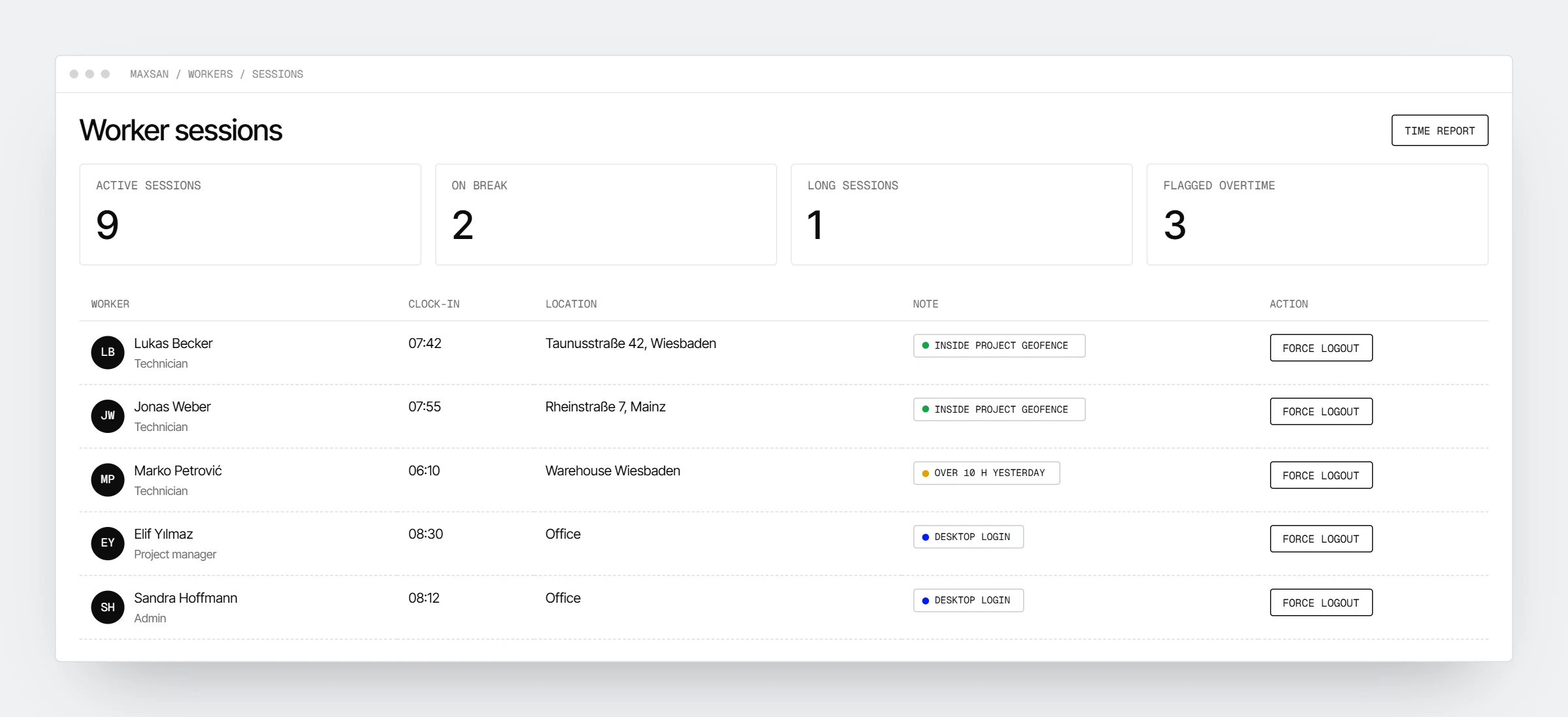
Technicians clock in and out and take breaks from their phone. Admins get a company-wide time report with the location of each entry, can draw geofences around a project or the warehouse, and see every live login with the option to force a logout.
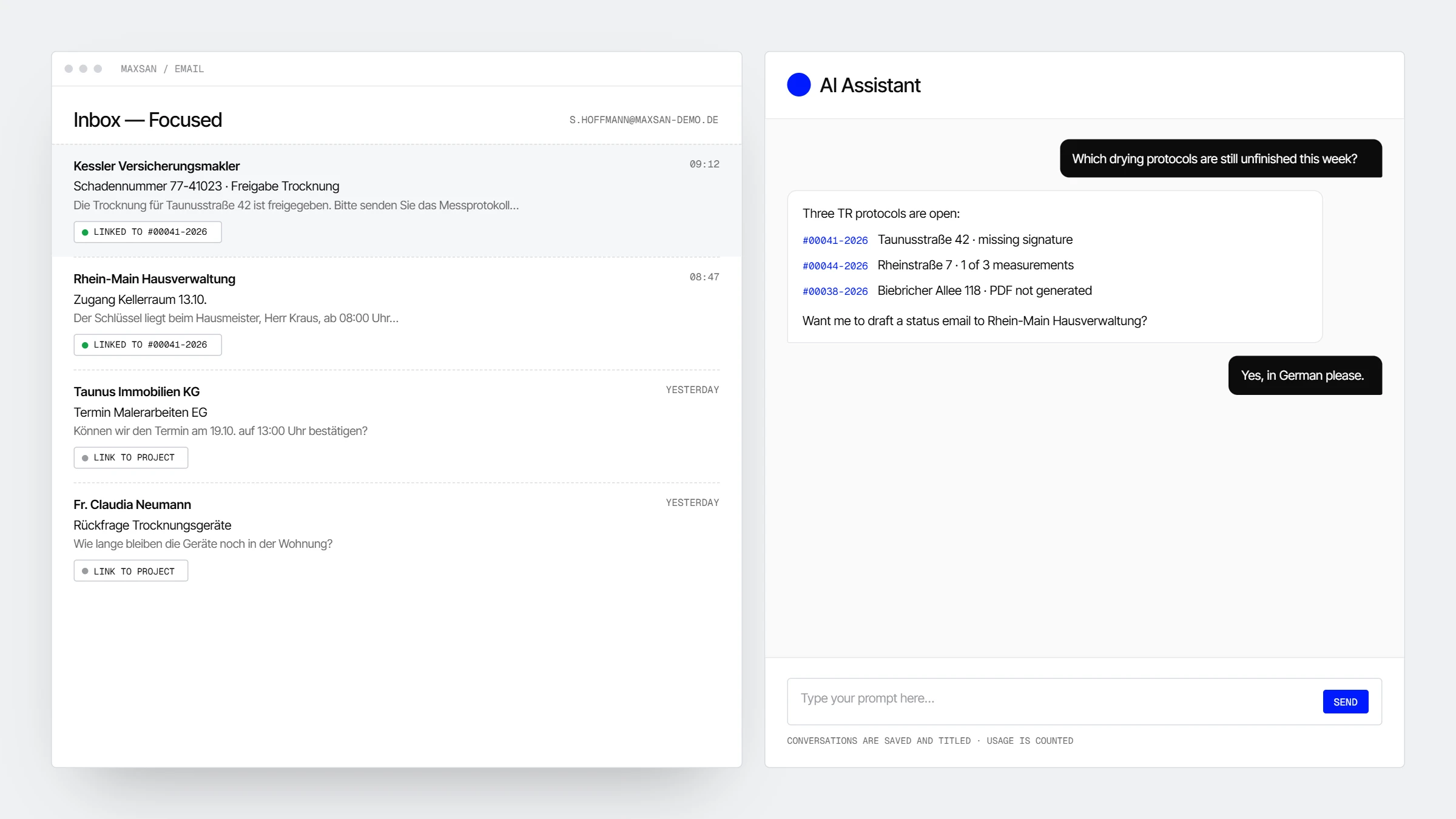
Each user connects their own Gmail or Outlook mailbox. Any message can be linked to a project, which writes an entry in that project’s activity log with the sender and a link back. Users with the AI permission get an assistant that reads the live database before it answers, from project status to unfinished drying protocols to a ready-to-send update email.
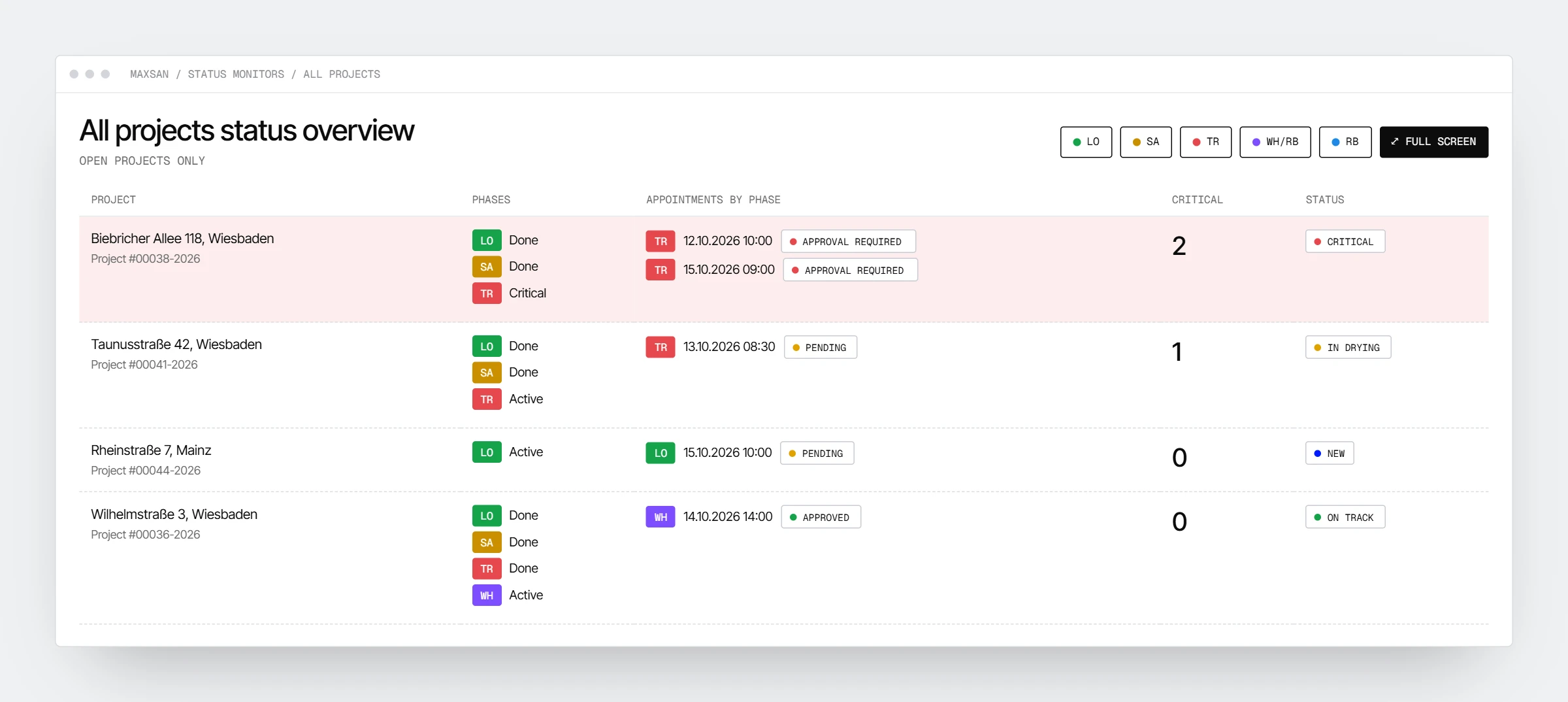
A board of all open projects shows every phase and every visit by phase, with critical items counted per job. Separate monitors for LO, SA, TR, WH, RB and WH/RB let each desk watch only its own stage, full screen on an office display.
Technicians use Maxsan on a phone in basements with weak signal. On small screens dense tables reflow into stacked cards, actions become full-width buttons, and the most urgent information stays at the top.
Most of the work was not adding features. It was deciding where the system should slow people down, and where it should get out of the way.
Driving to a basement nobody can open wastes a technician’s morning. Making approval the default state forces the office to confirm access first, while a dispatch override covers real emergencies.
Trade-off One extra click for the office on every visit, in exchange for far fewer wasted trips.
A visit on Monday that is still unapproved on Friday afternoon is urgent; one on Tuesday after a public holiday may not be. The pale-red warning uses a 2-working-day window that skips weekends and nationwide holidays.
Trade-off More logic to maintain, but the warning stays trustworthy and people keep paying attention to it.
The PDF is evidence for the insurer. Requiring the technician signature and total energy use at completion means every protocol in the system is usable, and the app flags any completed protocol missing its PDF.
Trade-off Technicians cannot close a protocol “for later”; they save it in progress instead.
Drying visits are often covered by whoever is free. Letting a technician open only the drying phase and offer files of a job they are booked on avoids giving everyone full project access.
Trade-off A more complex permission model, kept honest by the activity log.
Some instructions must be read before work starts, like a faulty machine or a changed key handover. A blocking note stops the technician’s app until they confirm it.
Trade-off Used sparingly, or it becomes noise; regular notes stay non-blocking.
job phases, from logistics to invoice
roles with separate menus
document folders on every project
appointment states, with per-contact approval
drying protocol types exported as signed PDFs
mail providers, Gmail and Outlook
The biggest lesson was that a restoration company’s real product is trust: trust that the technician will be let in, that the machine is where the system says, and that the measurements will hold up in front of an insurer. Approval states, signed PDFs and the activity log are all versions of the same promise.
Next, we would add offline capture for drying measurements in basements without signal, a client-facing portal where property managers approve visits themselves, and reporting on machine utilisation to show how many days each dryer actually earns.
“We have been working with Spot Software on several projects, including the development of our custom business management platform, Maxsan Tracking, and our company websites. Communication is excellent, deadlines are handled professionally, and the quality of work consistently meets our expectations.” — Maxsan Sanierung GmbH, Google review
Tell us what your business does today and what you want to improve. We will help define the next step.